 Coming to iOS and Android
Online with friends · Coming 25 Nov 2026
How to play an online cricket game with friends
Get your friends into one lobby, split into two sides and play each other ball by ball: one of you bowls, one of you bats, and the rest are in the field.
Cricket is better with people you know. NPL Cricket League is built around playing with friends: there is no waiting for strangers, no computer filling in for your mates, and every result is decided fairly by our server. This page explains how to play with friends in the cricket league, from the home screen to the first ball.
It describes the build we are testing now. Details can change before release on 25 Nov 2026; the full step-by-step guide is our news post on lobbies, codes and sides.
Before you start
What you need.
Three things, and none of them takes long.
- An account. Sign in with your email address. We send a one-time code each time, so there is no password to remember.
- A username that other players will see. You pick it the first time you sign in.
- A connection. Online matches are decided on our server, ball by ball, so the lobby and the match both need the internet. Practice mode works without it.
The lobby
Create a lobby and choose the rules.
Tap Play online on the home screen. You can Quick join the fullest open lobby that still has room, Create lobby, Browse open lobbies and lobbies hosted by your friends, or Join with code.
When you create a lobby you choose three things: the format, a 2-over Blitz or a 5-over Quick match (explained on our short cricket game page); the team size, anything from 1 v 1 up to 11 v 11; and who can join.
- Private: only people with the code or an invite.
- Friends: people on your friend list can also join.
- Open: anyone can find it in Browse and Quick join.
Getting friends in
Share the six-character code.
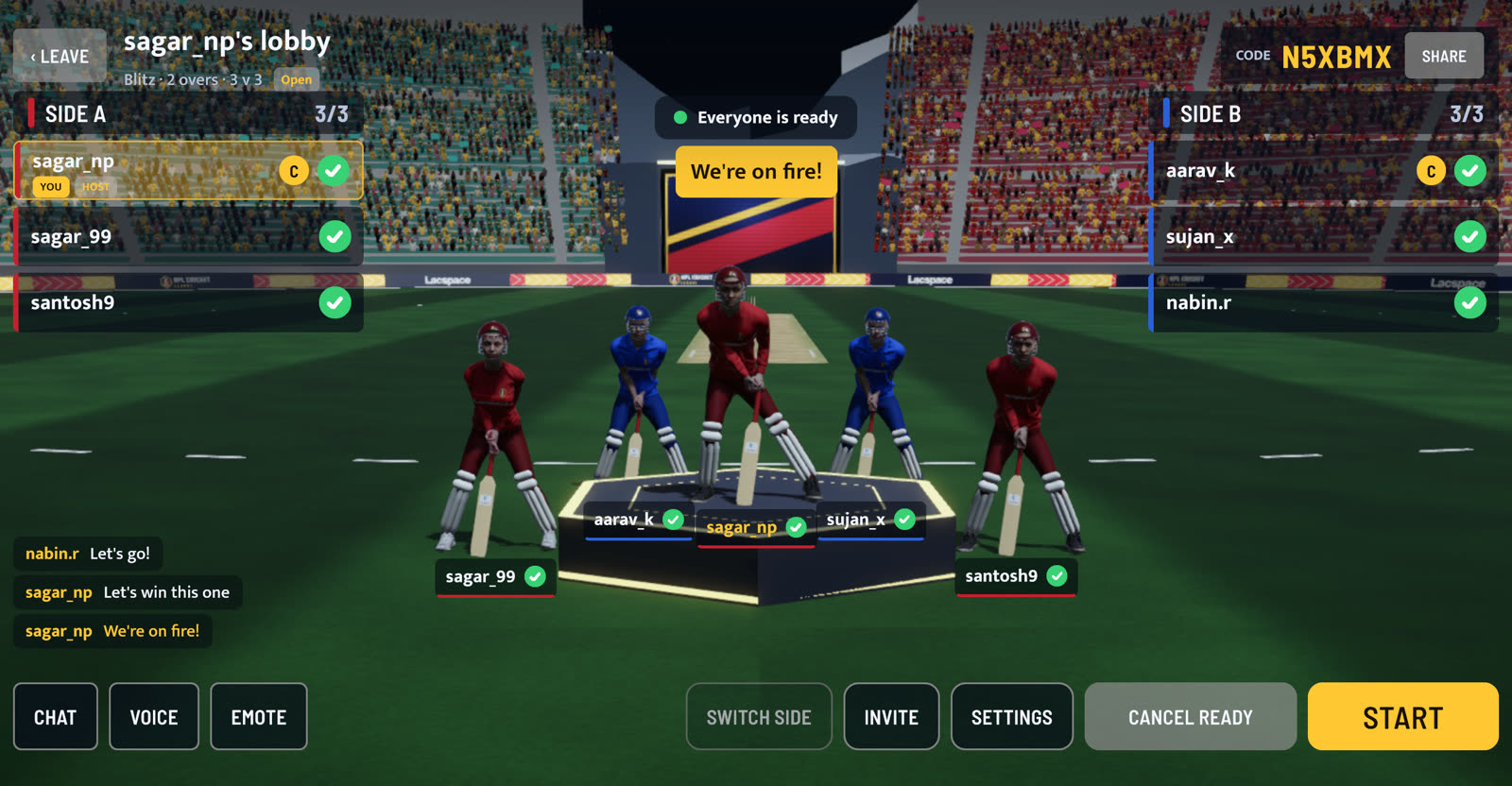
Every lobby has a six-character code at the top right, with a Share button beside it. Send the code in any chat app and your friends type it into Join with code.
If they are already on your friend list it is quicker still: tap Invite and pick them, and the invitation pops up on their screen. To add a friend, open the Friends panel from the home screen and send a request by username, or add a player you have just met in the lobby. As host you can change the settings until the match starts, and lock the lobby once everyone you want is in.
Sides and captains
Pick sides, tap Ready, start.
The lobby has two sides, Side A and Side B, with every player standing on the stage. Switch side moves you across if there is room. Each side has a captain, marked with a C; the host can make someone else captain, and a captain can hand it on.
When you are set, tap Ready. The host's Start button lights up once every player is ready and each side has at least one player. Then the captains take over: one calls the toss, the winner chooses to bat or bowl, each captain sets the batting order, and the fielding captain picks the bowler before every over.
Banter
Chat, voice calls and emotes.
Send one-tap chat lines like "Nice shot" or a short typed message, play a recorded voice call such as "Catch it!" or "Howzat!" for everyone, or make your player clap, salute or dance on the stage. If someone is unpleasant, tap their name to mute, report or block them. If your signal drops, your place is held so you can come straight back.
Step by step
From home screen to first ball.
Sign in
Sign in with your email and the one-time code we send, then pick a username.
Create a lobby
Tap Play online, then Create lobby. Choose Blitz (2 overs) or Quick (5 overs), a team size from 1 v 1 to 11 v 11, and Private, Friends or Open.
Share the code
Send the six-character lobby code with the Share button, or tap Invite to call friends from your friend list.
Pick sides
Everyone joins Side A or Side B. Each side has a captain, marked with a C.
Tap Ready
Each player taps Ready. When everyone is ready, the host taps Start.
Toss and play
A captain calls the toss, both captains set the batting order, the fielding captain picks a bowler, and the first ball is bowled.
Playing with friends: questions
How many friends can play together?
How do my friends join my lobby?
Can I play with friends offline?
Can strangers join a game with my friends?
What happens if my internet drops mid-match?
When can I play?
Keep reading
1 v 1 online →
Play one friend head-to-head: you bat, you bowl, nobody else.
2-over and 5-over matches →
Blitz and Quick: how long each takes and which to pick.
Online play →
Lobbies, the server that decides every ball, and fair play.
Game modes →
Blitz, Quick, lobbies with friends and Practice.
How to get the game →
Google Play and the App Store, pre-order and pre-registration, and why there is no APK.
Pre-order and pre-register →
Get the game on day one, 25 Nov 2026.
NPL Cricket League is a game by Lacspace, inspired by Nepal's T20 franchise cricket. Team names identify the franchises; the crests, kits and players in the game are our own, and all players are fictional. It is not affiliated with, endorsed by or licensed by the Cricket Association of Nepal, the Nepal Premier League or its franchises.