 Coming to iOS and Android
Practice mode · Offline
An offline cricket game vs AI: Practice against Lumi AI
No signal, no friends online, or ten quiet minutes with a bat: Practice mode is a complete match against Lumi AI, our computer opponent, and it runs entirely on your phone.
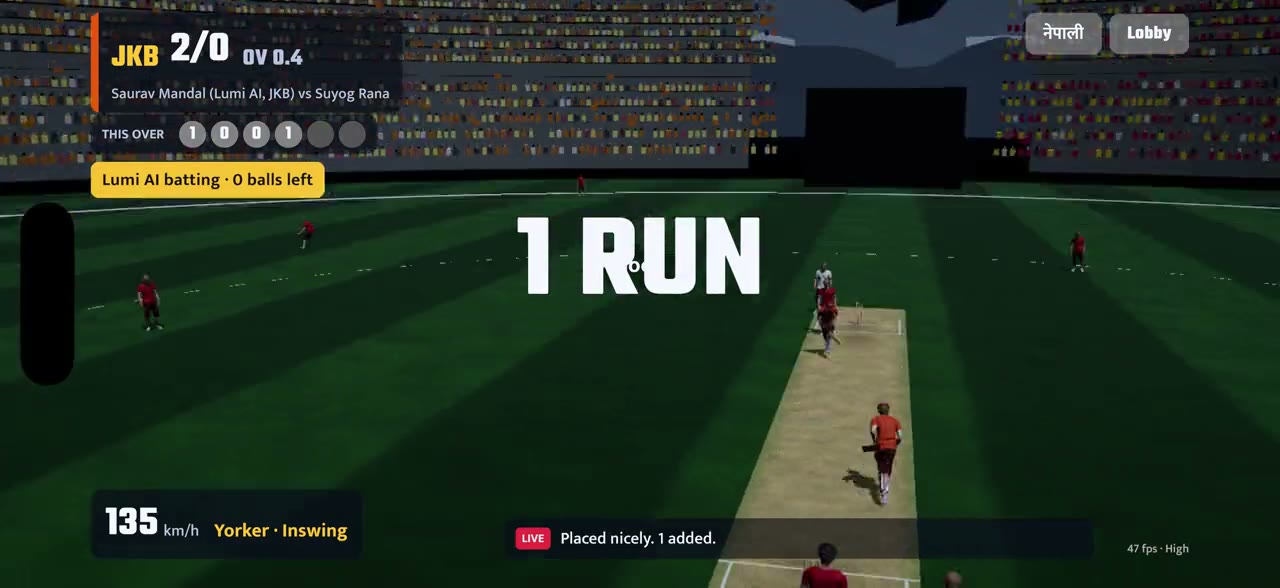
Looking for an offline cricket game vs AI? In NPL Cricket League that is Practice mode, the second button on the home screen, under Play online. It needs no internet connection, uses no mobile data and doesn't ask you to sign in. It is a real match: two innings, a target, a winner and a scorecard at the end.
This describes the build we are testing now, and details can change before release on 25 Nov 2026. The full guide is our news post on Practice mode.
Exactly what works offline
What you can do without the internet.
Practice is the whole of the offline game, and it is complete on its own.
- Works offline: a full Practice match against Lumi AI, choosing your team, the innings break, the scorecard, and playing again straight away. You can switch the camera view with CAM and the language at any time.
- Needs the internet: signing in, lobbies, playing friends or anyone else, chat and the friends list. Every online match is decided ball by ball on our server. See online play.
- Your record: nothing you do in Practice changes your online record, so it is the place to try things.
How a match runs
Pick a team, bowl first, then chase.
Before the match you choose which of the eight franchises you play for, and see each team's home ground, its motto and its star player with a rating. Lumi AI takes a different team each time, so you will meet them all. The full list is on the teams page.
You bowl first: drag on the pitch to choose where the ball lands, pick the delivery, and tap Bowl when the needle is in the green. An innings-break card shows what Lumi AI made and what you need. Then you bat: tap when the ring turns gold, the left half of the screen plays to the leg side, the right half to the off side, and the top half lofts the ball. Pass the target and you win; level scores are a tie.
Your opponent
Who is Lumi AI?
Lumi AI is the name of our computer opponent. In NPL Cricket League it plays only in Practice; online matches are always between real people, and Lumi AI never fills in for a missing player there.
It bats sensibly rather than perfectly. Bowl a good length on the stumps and it will defend. Drop short or stray wide and it will punish you, which is what a good batter does.
Same stadium
The full night ground, offline.
You are not practising in an empty net. Practice uses the full floodlit ground, the crowd in team colours, the commentary line and the TV cameras that follow a big hit, and the CAM button changes your view at any time. When we take online play down for maintenance, the game tells you on the home screen and Practice stays open. When you are winning more often than not, you are ready to play friends online.
Step by step
Play your first offline match.
Tap Practice
On the home screen, tap Practice, the button under Play online. No sign-in and no connection needed.
Pick your team
Choose one of the eight franchises. Lumi AI takes a different team.
Bowl first
Drag on the pitch to set where the ball lands, pick the delivery and tap Bowl when the needle is in the green.
Check the target
At the innings break, a card shows Lumi AI's score and the runs you need.
Chase it down
Tap when the ring turns gold: left half for the leg side, right half for the off side, top half to loft.
Read the scorecard
See both innings side by side, then play again or go back to the lobby.
Offline questions
Can I play NPL Cricket League offline?
Can I play with friends offline?
Does Practice count towards my online record?
How does an offline match against Lumi AI work?
Does Practice still work when online play is down for maintenance?
Keep reading
Game modes →
Blitz, Quick, lobbies with friends and Practice.
Play with friends →
Lobbies, six-character codes, sides and captains, step by step.
1 v 1 online →
Play one friend head-to-head: you bat, you bowl, nobody else.
The eight teams →
The franchises you can play as, with our own crests and kits.
How to get the game →
Google Play and the App Store, pre-order and pre-registration, and why there is no APK.
FAQ →
Straight answers about phones, language, friends and launch.
NPL Cricket League is a game by Lacspace, inspired by Nepal's T20 franchise cricket. Team names identify the franchises; the crests, kits and players in the game are our own, and all players are fictional. It is not affiliated with, endorsed by or licensed by the Cricket Association of Nepal, the Nepal Premier League or its franchises.